

Nero AI Video Upscaler - 4K/8K 120FPS
Upscale videos to 4K/8K 120FPS with AI - no watermarks on trial
What is Nero Ai Video Upscaler?
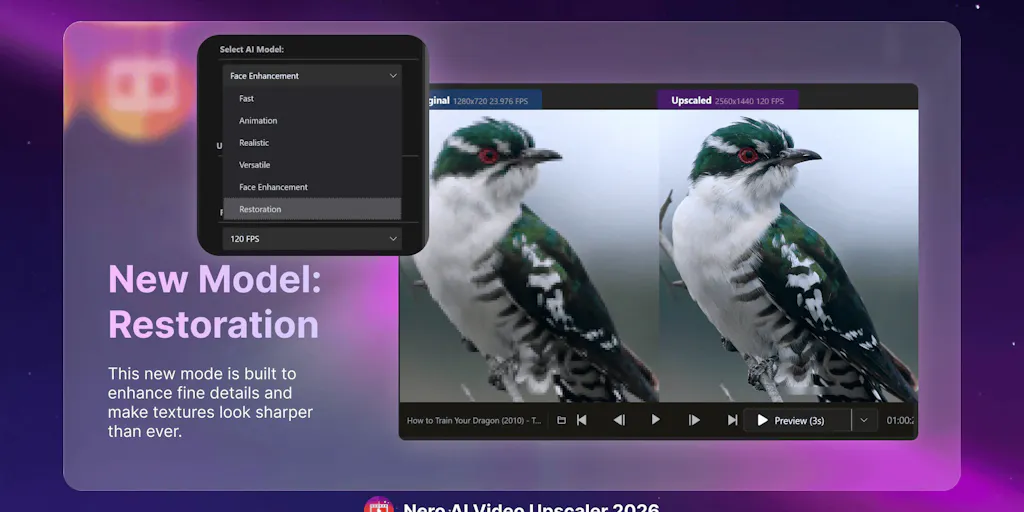
Nero AI Video Upscaler is a Windows desktop application that uses GPU-accelerated AI to upscale videos up to 8K resolution at 120FPS. It offers multiple specialized models for different content types - fast processing, animation, realistic footage, versatile general use, face enhancement, and video restoration. Designed for content creators, YouTubers, filmmakers, and anyone needing to improve video quality without losing details or natural motion.
Need help implementing Nero AI Video Upscaler - 4K/8K 120FPS?
Find verified specialists who work with Nero AI Video Upscaler - 4K/8K 120FPS
Key Features of Nero Ai Video Upscaler
- GPU-accelerated upscaling up to 8K 120FPS
- Multiple AI models (Fast, Animation, Realistic, Versatile, Face Enhancement, Restoration)
- AI Frame Interpolation for smoother 120FPS motion
- Real-time side-by-side preview
- Batch processing for multiple videos
- Face enhancement for people-focused footage
- Video color adjustment (brightness, contrast, saturation, sharpness, white balance)
- Upscale presets to save custom settings
- No watermark on trial exports
- Supports MP4, MOV, AVI and other formats
Who Should Use Nero Ai Video Upscaler?
Upscale vintage sitcom footage and old films
Restore low-resolution or compressed archival video
Enhance YouTube video quality for re-uploads
Improve anime and cartoon footage to 4K
Recover facial details in interviews and family videos
Process AI-generated videos for cleaner output
Batch upscale multiple videos for content libraries
Create smooth 120FPS versions from low-FPS clips
Nero Ai Video Upscaler: Pros & Cons
✓Pros
- Specialized AI models for different content types
- GPU acceleration for fast processing
- Real-time preview for quality checking
- Batch processing capability
- Face enhancement model for people-focused content
- Video restoration model for old footage
- Color adjustment controls
- No watermark during trial
- 7-day free trial with no credit card required
Frequently Asked Questions about Nero Ai Video Upscaler
What video formats does Nero AI Video Upscaler support?
The tool supports MP4, MOV, AVI, and other common video formats for import and upscaling.
Can I upscale multiple videos at once?
Yes, Nero AI Video Upscaler includes batch processing, allowing you to import and process multiple videos together.
What's the maximum resolution I can upscale to?
You can upscale videos up to 8K resolution at up to 120FPS frame rate.
Is there a watermark on exported videos?
No, there is no watermark on exports during the 7-day free trial.
Which AI model should I use for my video?
Nero offers six models: Fast (quick previews), Animation (anime/cartoons), Realistic (natural footage), Versatile (general use), Face Enhancement (people-focused), and Restoration (old/compressed footage). Choose based on your content type.
Tool Details
- Company
- Nero Software
- Pricing
- Free
- Category
- Ai Video Upscaler
- Added
- Jul 2026
More Ai Video Upscaler Tools
2 tools in the same category
Create professional 4K videos from text in seconds with AI

Transform any input into 4K videos in under 60 seconds with AI production intelligence
Recently Added AI Tools
New tools added to the directory

Share PDFs securely - no account, no trace, automatic expiration.

Batch download & auto-organize TikTok, Instagram, YouTube videos in one command

Instantly calculate your AP automation savings and ROI in seconds

Download YouTube thumbnails instantly in full HD, no signup required
From the Blog
Latest guides and tips on AI tools
Best AI Tools for Ecommerce in 2026
Best AI Tools for Ecommerce in 2026
Best AI ToolsBest AI Tools for Digital Marketers in 2026
Best AI Tools for Digital Marketers in 2026
Best AI ToolsBest AI Tools for Freelancers in 2026
Best AI Tools for Freelancers in 2026
Best AI ToolsBest AI Tools for Small Business Owners in 2026
Best AI Tools for Small Business Owners in 2026
Best AI ToolsWant to list your AI tool on NextStair?
Submit Tool