

SuperPay - One-Time and Recurring Payments, No Code
Collect payments hassle-free with no coding or monthly fees
Add your screenshot here
Image or video shown in this spot
What is Superpay?
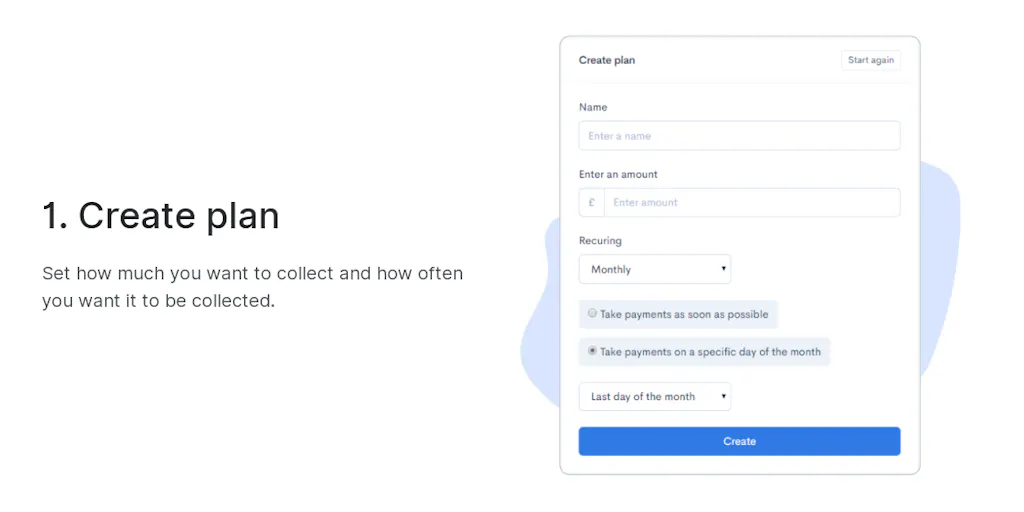
SuperPay is a payment collection platform that enables businesses to accept one-time and recurring payments in minutes without technical setup. It handles payment processing, failed payment retries, and multi-currency support so businesses can focus on growth. Designed for solopreneurs, freelancers, and small-to-medium businesses, it offers transparent pricing with just 1% per transaction and no hidden fees.
Need help implementing SuperPay - One-Time and Recurring Payments, No Code?
Find verified specialists who work with SuperPay - One-Time and Recurring Payments, No Code
Key Features of Superpay
- One-time and recurring payment collection
- No-code payment setup
- 1% transaction fee only
- Apple Pay, Google Pay, Microsoft Pay support
- Intelligent failed payment retries
- Fully customizable collection dates
- Multi-currency payment links
- Payment link tracking and history
- SCA compliance for card security
- Mobile-responsive payment forms
Who Should Use Superpay?
Collect subscription and recurring payments from clients
Send one-time payment requests to customers
Embed payment forms on your website
Automate client payment collection
Manage setup fees alongside recurring payments
Superpay: Pros & Cons
✓Pros
- Only 1% per transaction with no monthly or hidden fees
- No credit card required to start
- No contracts or long-term commitments
- Cancel anytime
- Supports all major card networks and digital wallets
- Intelligent retries reduce failed payment losses
- Fully customizable payment collection dates
- Excellent customer support
- Trusted by 5,000+ companies
Frequently Asked Questions about Superpay
How much does SuperPay cost?
SuperPay charges only 1% per transaction with no monthly fees, setup costs, or contracts. You can cancel anytime.
Do I need coding knowledge to use SuperPay?
No, SuperPay requires no code or technical knowledge. You can create an account and start accepting payments within minutes.
What payment methods does SuperPay support?
SuperPay supports all major card networks (Visa, Mastercard, etc.) as well as Apple Pay, Google Pay, and Microsoft Pay.
Can I set up recurring payments with SuperPay?
Yes, you can quickly set up payment plans with customizable collection dates, one-off setup fees, and intelligent retries for failed payments.
Is there a free trial?
Yes, SuperPay offers a free trial with no credit card required, no contracts, and the ability to cancel anytime.
Tool Details
- Company
- Rosenbridge Ltd
- Pricing
- Free
- Category
- Invoice Tools
- Added
- Jul 2026
- Last Updated
- Jul 2026
More Invoice Tools Tools
7 tools in the same category

AI agents that automate collections and get you paid faster

Stop hunting invoices. Let AI organize them automatically.

AI-powered invoicing and accounting in seconds

Free accounting platform built for UK small businesses and their accountants
Professional invoices, payslips & quotes in seconds. Get paid faster.
Free, unlimited invoices in seconds - no signup required

Professional invoices & quotes in seconds, no signup required
Recently Added AI Tools
New tools added to the directory



Share PDFs securely - no account, no trace, automatic expiration.

Batch download & auto-organize TikTok, Instagram, YouTube videos in one command
From the Blog
Latest guides and tips on AI tools
Free Logo Maker Apps in 2026
Free Logo Maker Apps in 2026
AI Image GenerationBest AI Tools for Ecommerce in 2026
Best AI Tools for Ecommerce in 2026
Best AI ToolsBest AI Tools for Digital Marketers in 2026
Best AI Tools for Digital Marketers in 2026
Best AI ToolsBest AI Tools for Freelancers in 2026
Best AI Tools for Freelancers in 2026
Best AI ToolsWant to list your AI tool on NextStair?
Submit Tool