

Simple SEO Tool - On-Page Analysis Without Complexity
Free Chrome extension for quick, simple SEO on-page analysis
Add your screenshot here
Image or video shown in this spot
What is Simple Seo Tool?
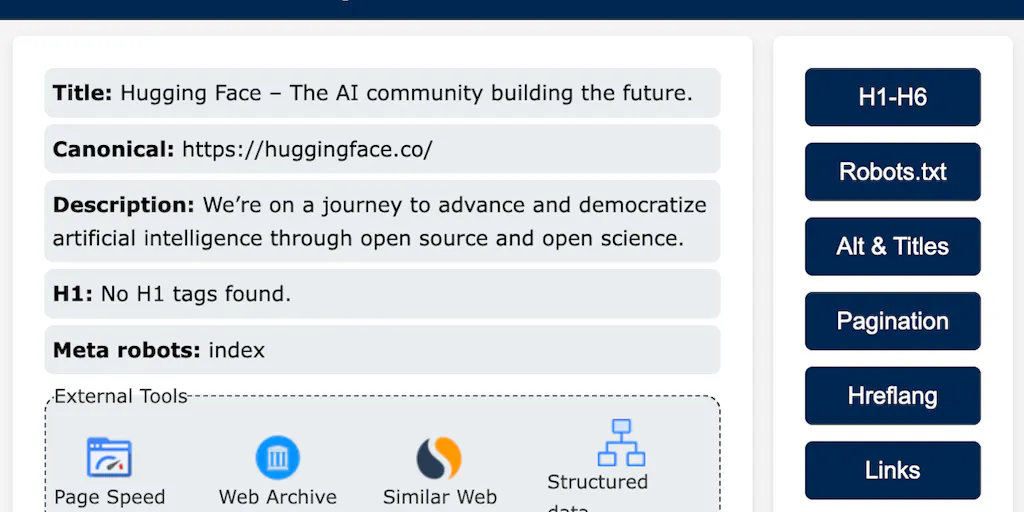
Simple SEO Tool is a free Chrome extension that streamlines on-page SEO analysis and optimization. It provides instant checks for indexing status, metadata quality, page speed, internal/external links, structured data, and hreflang attributes. Designed for both beginners and experienced SEO professionals, it cuts through complexity to help websites improve visibility and search engine rankings.
Need help implementing Simple SEO Tool - On-Page Analysis Without Complexity?
Find verified specialists who work with Simple SEO Tool - On-Page Analysis Without Complexity
Key Features of Simple Seo Tool
- Indexing check
- Metadata verification (titles and descriptions)
- Speed insights
- Link evaluation (internal and external)
- Structured data optimization
- Hreflang attribute checks
Who Should Use Simple Seo Tool?
Quick on-page SEO audits for website owners
Verifying metadata and titles for better rankings
Checking page indexing status with search engines
Analyzing internal and external link quality
Optimizing structured data for rich snippets
Ensuring correct hreflang setup for international sites
Simple Seo Tool: Pros & Cons
✓Pros
- Completely free to use
- Privacy-focused (no personal data collection)
- Minimalistic and accessible design
- Covers comprehensive on-page SEO elements
- Real-time analysis directly in browser
- Follows Google's latest recommendations
- High user satisfaction (4.97/5 rating)
Frequently Asked Questions about Simple Seo Tool
Is this extension free to use?
Yes, the extension is completely free to use. The creator believes in helping the SEO community by providing a powerful tool at no cost.
How does this extension respect user privacy?
The extension is designed with privacy as a priority. It does not collect or store any personal data, ensuring your browsing remains private and secure.
What permissions does the extension need and why?
The extension requires "activeTab" permission to analyze SEO elements on the current webpage, and "scripting" permission to inject scripts for real-time web content analysis and provide accurate SEO insights.
Can I get support if I encounter issues?
Yes, you can reach out to [email protected] for questions or assistance. The creator manages support personally and aims to respond as quickly as possible.
Tool Details
- Pricing
- Free
- Category
- Seo Extensions
- Added
- Jul 2026
- Last Updated
- Jul 2026
More Seo Extensions Tools
4 tools in the same category

See clicks, CTR & position in Google's AI Overviews report - no spreadsheets needed

Free SEO audit & performance reports in seconds, no signup needed

All-in-one SEO browser extension for daily SEO tasks

Instant on-page SEO analysis integrated with Google Search Console
Recently Added AI Tools
New tools added to the directory



Share PDFs securely - no account, no trace, automatic expiration.

Batch download & auto-organize TikTok, Instagram, YouTube videos in one command
From the Blog
Latest guides and tips on AI tools
Free Logo Maker Apps in 2026
Free Logo Maker Apps in 2026
AI Image GenerationBest AI Tools for Ecommerce in 2026
Best AI Tools for Ecommerce in 2026
Best AI ToolsBest AI Tools for Digital Marketers in 2026
Best AI Tools for Digital Marketers in 2026
Best AI ToolsBest AI Tools for Freelancers in 2026
Best AI Tools for Freelancers in 2026
Best AI ToolsWant to list your AI tool on NextStair?
Submit Tool