


Local Parrot - Offline Voice-to-Text, No Internet Required
Private voice-to-text that never leaves your device
Add your screenshot here
Image or video shown in this spot
What is Local Parrot?
LocalParrot is a private, offline voice-to-text application for Windows that performs recording, transcription, and typing entirely on your device with zero network connections. It works without internet, requires no account or subscription, and has been audited to verify no data leaves your machine. Perfect for users who prioritize privacy and want a one-time purchase alternative to cloud-based dictation tools.
Need help implementing Local Parrot - Offline Voice-to-Text, No Internet Required?
Find verified specialists who work with Local Parrot - Offline Voice-to-Text, No Internet Required
Key Features of Local Parrot
- Offline voice-to-text transcription
- Zero network connections verified
- No account or subscription required
- Works without internet connection
- One-time purchase, lifetime use
- Audited binary with reproducible security checks
- Instant on-device transcription
- No telemetry or tracking
- Works on Windows 10 and 11
Who Should Use Local Parrot?
Dictating text in any application without cloud uploads
Transcribing voice notes on private networks
Using voice-to-text without internet connectivity
Secure documentation for sensitive work environments
Privacy-focused users avoiding cloud services
Local Parrot: Pros & Cons
✓Pros
- Completely offline with verified zero network connections
- No subscription or recurring fees
- No account creation or sign-up required
- Fully audited and reproducible security
- Instant transcription with no cloud round-trip delay
- Works without internet or WiFi
- Simple one-key activation workflow
- Free updates included
✕Cons
- Windows only at launch (Mac and Linux coming later)
- Limited to Windows 10 and 11
- No cross-device synchronization
- No cloud backup of transcriptions
Frequently Asked Questions about Local Parrot
Does Local Parrot work without an internet connection?
Yes. Local Parrot runs entirely offline on your Windows device with zero network connections, verified through security audits. You can dictate and transcribe without WiFi, broadband, or any internet access.
Can I use Local Parrot across multiple devices or sync transcriptions to the cloud?
Local Parrot does not support cross-device synchronization or cloud backup. Transcriptions stay on the device where you record them, which is the tradeoff for keeping all your data private and offline.
What Windows versions does Local Parrot support?
Local Parrot runs on Windows 10 and Windows 11. The developer has stated that Mac and Linux versions are coming later, but they are not yet available.
Do I need to create an account or pay a subscription to use Local Parrot?
No. Local Parrot is a one-time purchase for $14.99 with lifetime use and free updates included. You do not need to create an account, log in, or pay any recurring fees.
Tool Details
- Pricing
- Free
- Category
- Ai Voice Cloning
- Added
- Jul 2026
- Last Updated
- Jul 2026
More Ai Voice Cloning Tools
5 tools in the same category

Translate, dub, and lip-sync videos in 160+ languages 30x faster
The most realistic AI voices and voice cloning for any content or app
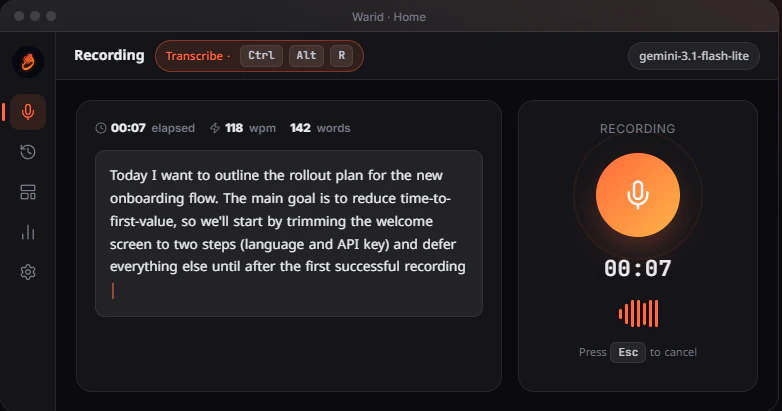
Press Ctrl+Alt+R, speak, get clean text instantly - no signup needed.

Your voice, in every language. Preserve your essence, reach billions.
Clone any voice in 3 seconds with AI-powered precision
Recently Added AI Tools
New tools added to the directory
Your go-to source for crypto market data and insights.

Powering your crypto project from concept to launch.

Unlock institutional DeFi insights for free.

From the Blog
Latest guides and tips on AI tools
Best Free AI Chatbot Builders for Websites in 2026
Best Free AI Chatbot Builders for Websites in 2026
Best AI ToolsBest No-Code AI Tools in 2026
Best No-Code AI Tools in 2026
Best AI ToolsBest AI Tools for Real Estate Agents in 2026
Best AI Tools for Real Estate Agents in 2026
Best AI ToolsFree Logo Maker Apps in 2026
Free Logo Maker Apps in 2026
AI Image GenerationWant to list your AI tool on NextStair?
Submit Tool