
Warid - Arabic-English Voice to Text Offline
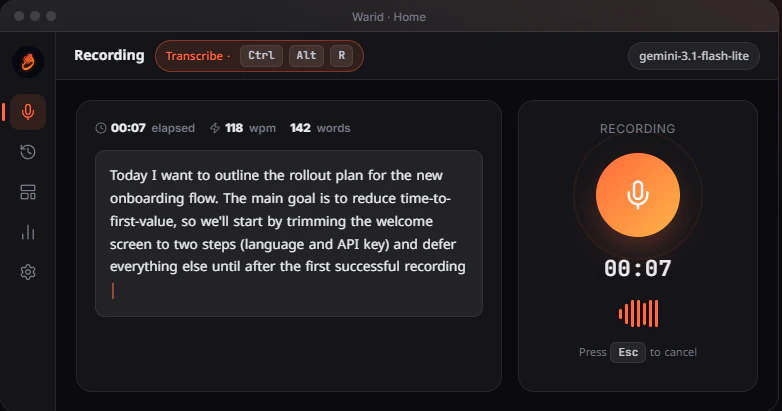
Press Ctrl+Alt+R, speak, get clean text instantly - no signup needed.
Add your screenshot here
Image or video shown in this spot
What is Warid?
Warid is a lightweight desktop app that converts your voice into clean text using Google's free Gemini API. It supports bilingual Arabic-English transcription with full code-switching capabilities, processes audio locally on your machine, and stores all transcriptions in a local SQLite database. Designed for professionals and multilingual users who need fast, privacy-focused voice-to-text without subscriptions or cloud dependencies.
Need help implementing Warid - Arabic-English Voice to Text Offline?
Find verified specialists who work with Warid - Arabic-English Voice to Text Offline
Key Features of Warid
- Global hotkey (Ctrl+Alt+R) for instant voice recording
- Native Arabic + English with full RTL support and code-switching
- Custom commands for transcription, translation, polishing, formatting, and code writing
- Local-first architecture with no data sent to cloud except audio
- Local SQLite database for history and search
- Word and speed analytics (WPM, sessions, streaks, milestones)
- Live waveform and pulse indicator during recording
- Auto-copy to clipboard
- Free with personal Google Gemini API key
- Open source
- Cross-platform (Windows, macOS, Linux)
Who Should Use Warid?
Fast voice note capture for writers and developers
Bilingual transcription for Arabic-English speakers
Real-time meeting note-taking and documentation
Code dictation with custom formatting commands
Email composition via voice
Tracking speaking patterns and productivity metrics
Privacy-focused transcription without cloud services
Warid: Pros & Cons
✓Pros
- Completely free with no subscription required
- Open source and transparent
- Full privacy control - audio stays on your machine
- Low system footprint (~10 MB, ~30 MB RAM)
- Seamless global hotkey accessible from any app
- Bilingual Arabic-English support with code-switching
- Local history and analytics
- Customizable commands with individual hotkeys and prompts
- No account creation needed
Frequently Asked Questions about Warid
Does Warid send my audio to Google or keep it local?
Warid processes audio locally on your machine and only sends it to Google's Gemini API for transcription; nothing is stored on Google's servers. Your transcriptions live in a local SQLite database that you control, so you keep a full history without relying on cloud storage.
Can Warid transcribe both Arabic and English in the same recording?
Yes, Warid supports full code-switching between Arabic and English in a single recording, with native right-to-left support for Arabic text. This makes it particularly useful for bilingual speakers who mix both languages naturally.
What do I need to set up Warid?
You need a personal Google Gemini API key, which Google offers free on their free tier; Warid itself requires no signup or account. Once you plug in your key, the Ctrl+Alt+R hotkey works instantly from anywhere on your machine.
Can I create custom voice commands in Warid?
Yes, Warid lets you define custom commands like transcription, translation, polishing, formatting, and code writing, each with its own hotkey and prompt. This lets you route voice input to different tasks without stopping to manually edit.
Tool Details
- Pricing
- Free
- Languages
- Arabic, English
- Category
- Ai Voice Cloning
- Added
- Jul 2026
- Last Updated
- Jul 2026
More Ai Voice Cloning Tools
5 tools in the same category

Translate, dub, and lip-sync videos in 160+ languages 30x faster
The most realistic AI voices and voice cloning for any content or app

Private voice-to-text that never leaves your device

Your voice, in every language. Preserve your essence, reach billions.
Clone any voice in 3 seconds with AI-powered precision
Recently Added AI Tools
New tools added to the directory
Your go-to source for crypto market data and insights.

Powering your crypto project from concept to launch.

Unlock institutional DeFi insights for free.

From the Blog
Latest guides and tips on AI tools
Best Free AI Chatbot Builders for Websites in 2026
Best Free AI Chatbot Builders for Websites in 2026
Best AI ToolsBest No-Code AI Tools in 2026
Best No-Code AI Tools in 2026
Best AI ToolsBest AI Tools for Real Estate Agents in 2026
Best AI Tools for Real Estate Agents in 2026
Best AI ToolsFree Logo Maker Apps in 2026
Free Logo Maker Apps in 2026
AI Image GenerationWant to list your AI tool on NextStair?
Submit Tool