


Manganum - Productivity Apps in Chrome Sidebar
Productivity apps in your Chrome sidebar - no tab switching needed
What is Manganum Sidebar For Google Chrome?
Manganum is a Chrome sidebar extension that consolidates productivity apps like Gmail, Calendar, Drive, Notes, Tasks, and ChatGPT into one accessible panel. It eliminates tab-switching by bringing Google Calendar, Keep, Tasks, and ChatGPT directly into any browser tab. Designed for Chrome users who want to stay focused and organized without losing context while browsing.
Need help implementing Manganum - Productivity Apps in Chrome Sidebar?
Find verified specialists who work with Manganum - Productivity Apps in Chrome Sidebar
Key Features of Manganum Sidebar For Google Chrome
- Google Calendar with soft notifications
- One-click meeting joins (Zoom, Google Meet, Teams)
- Google Keep with full feature support
- Google Tasks on every tab
- SMS sync from Android
- ChatGPT integration
- Gmail sidebar
- Google Translate
- Todoist support
- Browser history access
- Calculators and mini-games
Who Should Use Manganum Sidebar For Google Chrome?
Keep notes visible while browsing without switching tabs
Manage tasks and to-do lists without losing context
View calendar events and join meetings from any webpage
Sync SMS messages while working on desktop
Quickly access Gmail and email without tab switching
Translate text on the fly while researching
Manganum Sidebar For Google Chrome: Pros & Cons
✓Pros
- Free to install
- Fully integrated with major meeting platforms (Zoom, Google Meet, Microsoft Teams)
- Google Keep supports all features including background colors and dark theme
- No need to switch browser tabs
- Supports multiple productivity apps in one sidebar
- One-click access to features
Frequently Asked Questions about Manganum Sidebar For Google Chrome
What apps are included in Manganum?
Manganum includes Gmail, Google Calendar, Google Keep, Google Tasks, ChatGPT, Google Translate, Todoist, SMS sync, and more.
Do I need to switch tabs to use Manganum apps?
No. All apps are available in the sidebar on every Chrome tab, so you can access them without losing context.
Which meeting platforms does Manganum support?
Manganum is fully integrated with Zoom, Google Meet, and Microsoft Teams.
Does Google Keep in Manganum support all features?
Yes. Unlike the Gmail or Google Calendar sidebar, Manganum's Google Keep app supports all features including note background colors and dark theme.
How much does Manganum cost?
Manganum is completely free to install from the Chrome Web Store.
Tool Details
- Company
- Manganum Inc.
- Pricing
- Free
- Category
- Ai Chrome Ext
- Added
- Jul 2026
More Ai Chrome Ext Tools
7 tools in the same category

Chat with all AI models in one free, powerful assistant
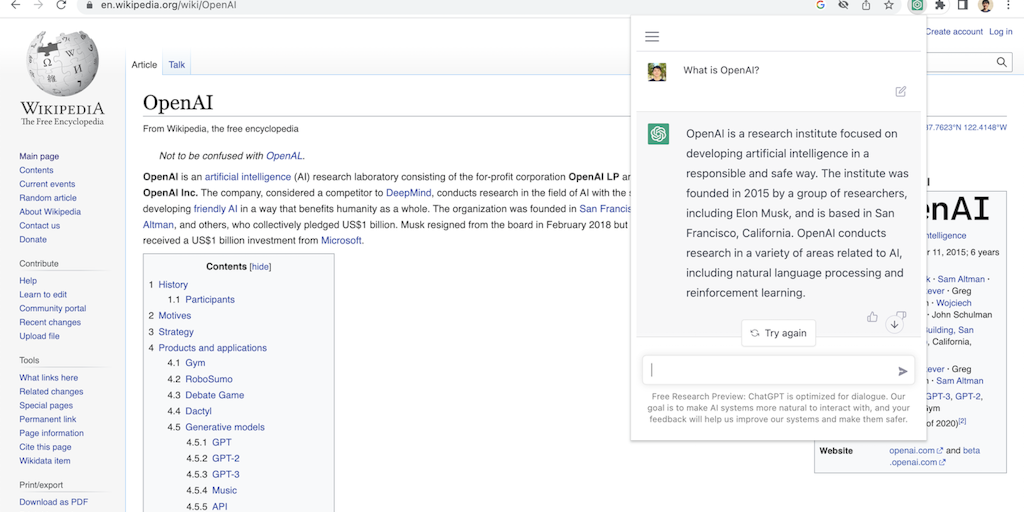
Access ChatGPT from anywhere on the web with one click

Translate, summarize & explain web text instantly with private AI

SEO data + AI search tracking in one Chrome extension

Native OS AI that stays in your flow - no tab switching, no context loss.
Private on-device AI copilot that works offline, instantly.

Record workflows once, auto-generate SOPs with screenshots instantly
Recently Added AI Tools
New tools added to the directory



Share PDFs securely - no account, no trace, automatic expiration.

Batch download & auto-organize TikTok, Instagram, YouTube videos in one command
From the Blog
Latest guides and tips on AI tools
Free Logo Maker Apps in 2026
Free Logo Maker Apps in 2026
AI Image GenerationBest AI Tools for Ecommerce in 2026
Best AI Tools for Ecommerce in 2026
Best AI ToolsBest AI Tools for Digital Marketers in 2026
Best AI Tools for Digital Marketers in 2026
Best AI ToolsBest AI Tools for Freelancers in 2026
Best AI Tools for Freelancers in 2026
Best AI ToolsWant to list your AI tool on NextStair?
Submit Tool