

BringYourAI - Connect VSCode to ChatGPT
Connect your codebase to any AI chat with one @ symbol
What is Bringyourai?
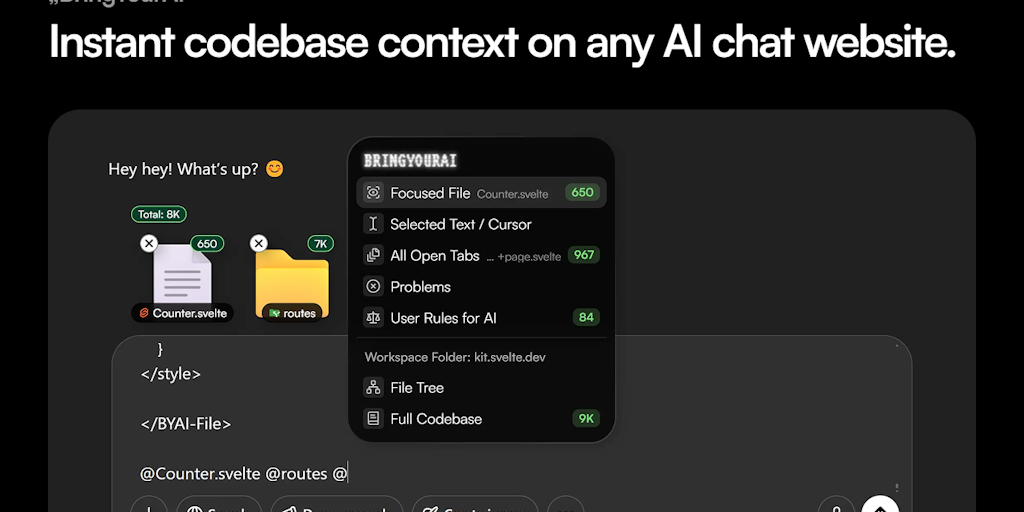
BringYourAI is a Chrome extension and VSCode plugin that seamlessly connects your codebase to any AI chat website like ChatGPT, Claude, or Google AI Studio. It eliminates messy copy-pasting by letting you share code context with a single @ symbol, complete with file attachments, folder context, and cursor position tracking. Perfect for developers who want to leverage cutting-edge AI models without switching tools or losing access to their favorite chat features.
Need help implementing BringYourAI - Connect VSCode to ChatGPT?
Find verified specialists who work with BringYourAI - Connect VSCode to ChatGPT
Key Features of Bringyourai
- One @ symbol for instant codebase context
- File and folder attachments
- Cursor position sharing
- Context chips for easy viewing and editing
- Works with any AI chat website
- No lock-in to single AI platform
- Zero IDE performance impact
- Supports million-token context windows
Who Should Use Bringyourai?
Developers getting instant code context in ChatGPT without copy-pasting
Engineers leveraging free AI models like Google's AI Studio or Microsoft's Copilot
Teams maximizing existing AI chat subscriptions with coding features
Programmers switching between different AI chat websites seamlessly
Bringyourai: Pros & Cons
✓Pros
- Works with any AI chat website - no vendor lock-in
- Instant access to latest AI models and their features
- Clean context chips keep chat history organized
- No performance impact on VSCode
- Leverage free high-quality AI models with massive token windows
- Preserves favorite chat features like search, memory, and projects
Frequently Asked Questions about Bringyourai
How secure is my code?
The page does not provide specific details about code security mechanisms, so check the Privacy Policy and Docs for full security information.
Does this work with any AI chat website?
Yes, BringYourAI works with any AI chat website, including ChatGPT, Claude, Google AI Studio, and Microsoft Copilot, so you're not locked into one tool.
Is there a performance impact on my IDE?
No, BringYourAI has zero performance impact on VSCode, so it runs seamlessly in the background.
What AI models can I access with BringYourAI?
You can access the latest AI models available on any AI chat website you use, including Google's million-token context models and Microsoft's unlimited o3-mini-high.
How does the context sharing work?
Simply use @ to bring code context into any chat. You can attach files, folders, and even share your exact cursor position without leaving the chat interface.
Tool Details
- Pricing
- Free
- Category
- Vscode Ai Ext
- Added
- Jul 2026
More Vscode Ai Ext Tools
2 tools in the same category

Automated backups & disaster recovery for GitHub, GitLab, Azure DevOps & Linear

Recently Added AI Tools
New tools added to the directory

Deploy AI workers that take real actions in your systems, 24/7.

Free API to extract Open Graph data from any URL instantly


From the Blog
Latest guides and tips on AI tools
Best AI Tools for Ecommerce in 2026
Best AI Tools for Ecommerce in 2026
Best AI ToolsBest AI Tools for Digital Marketers in 2026
Best AI Tools for Digital Marketers in 2026
Best AI ToolsBest AI Tools for Freelancers in 2026
Best AI Tools for Freelancers in 2026
Best AI ToolsBest AI Tools for Small Business Owners in 2026
Best AI Tools for Small Business Owners in 2026
Best AI ToolsWant to list your AI tool on NextStair?
Submit Tool