

Fonts Ninja Chrome Extension
Identify any font on the web in seconds
What is Fonts Ninja Chrome Extension?
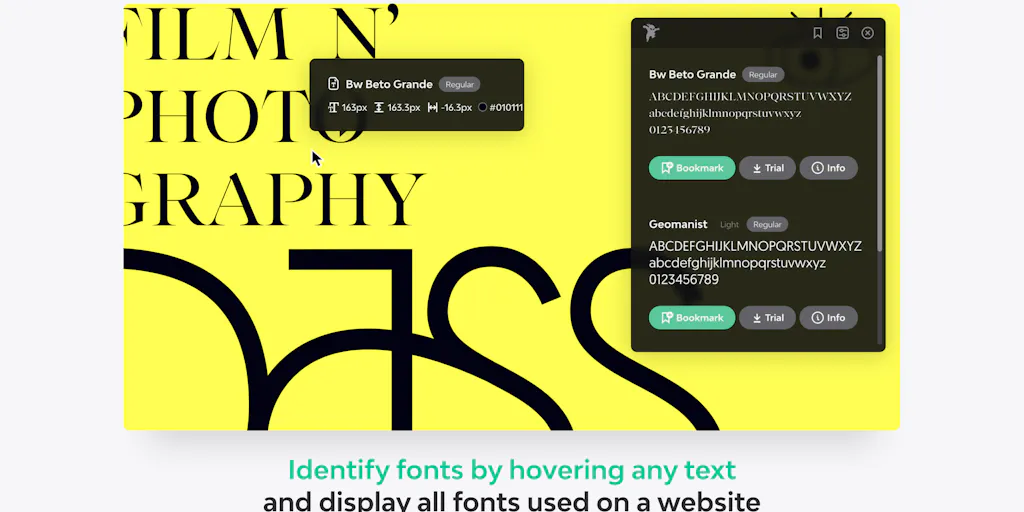
Fonts Ninja is a Chrome extension that identifies fonts from any website instantly using proprietary Font DNA technology. Designers rollover text to extract font names, CSS properties, and detailed information including styles, foundries, and pricing. Perfect for designers, developers, and creative professionals who need to speed up their design workflow and discover font inspiration.
Need help implementing Fonts Ninja Chrome Extension?
Find verified specialists who work with Fonts Ninja Chrome Extension
Key Features of Fonts Ninja Chrome Extension
- Font identification with Font DNA algorithm
- CSS properties extraction
- Font bookmarks and organization
- Similar fonts discovery
- Font details (styles, foundry, price)
- Multi-parameter search with filters
- Font summaries for entire websites
- Shareable font bookmarks
- Character shape and license type filtering
Who Should Use Fonts Ninja Chrome Extension?
Speed up design workflow by identifying fonts on competitor websites
Discover and bookmark fonts for design projects
Find similar or complementary fonts for design inspiration
Extract CSS properties from live websites
Share font collections with team members or clients
Research font availability and pricing during design process
Fonts Ninja Chrome Extension: Pros & Cons
✓Pros
- Fast font identification with improved processing speed
- Accurate results using proprietary Font DNA algorithm
- Comprehensive font details including styles and foundry information
- Shareable bookmarks for team collaboration
- Advanced search with multiple filter options
- Clean, redesigned UI
- Free to use
Frequently Asked Questions about Fonts Ninja Chrome Extension
How does Fonts Ninja identify fonts on websites?
The extension uses a proprietary Font DNA algorithm that analyzes font files to provide accurate results. Simply rollover any text on a website to get the font name and CSS properties.
Can I save fonts I discover?
Yes, you can bookmark fonts and manage your font collection right within the extension. You can also share your bookmarks with team members or friends.
What information does Fonts Ninja provide about fonts?
The extension shows you the font name, CSS properties, number of available styles, foundry information, price, and similar or complementary font recommendations.
How many users does Fonts Ninja have?
Fonts Ninja has over 900,000 active users and maintains a 4.4 out of 5 star rating based on 889 user reviews.
Is there a cost to use Fonts Ninja?
No, Fonts Ninja is completely free to install and use as a Chrome extension.
Tool Details
- Pricing
- Free
- Languages
- English (United States)
- Category
- Ai Fonts
- Added
- Jul 2026
More Ai Fonts Tools
7 tools in the same category

Generate stunning AI fonts, signatures & logos in seconds - free, no design skills needed

Create custom fonts from sketches—free, in your browser, no signup needed.

Manage 6,000+ fonts with one click. Works with Photoshop, Illustrator & more.

Transform your text into 50+ stunning fonts in real-time

Find and pair the perfect fonts for your project instantly.
A monospace font that makes code readable and beautiful
Turn your handwriting into a real font in under a minute
Recently Added AI Tools
New tools added to the directory

AI-powered legal research platform with 500K+ official Mexican documents

Track your mood, journal your thoughts, heal your mind with AI insights.

City-scale AR positioning with centimeter-level precision

From the Blog
Latest guides and tips on AI tools
Best AI Tools for Ecommerce in 2026
Best AI Tools for Ecommerce in 2026
Best AI ToolsBest AI Tools for Digital Marketers in 2026
Best AI Tools for Digital Marketers in 2026
Best AI ToolsBest AI Tools for Freelancers in 2026
Best AI Tools for Freelancers in 2026
Best AI ToolsBest AI Tools for Small Business Owners in 2026
Best AI Tools for Small Business Owners in 2026
Best AI ToolsWant to list your AI tool on NextStair?
Submit Tool