

Disbug
Capture bugs with complete context in one click
What is Disbug?
Disbug is a Chrome extension that streamlines bug reporting by capturing screen recordings, screenshots, console logs, network logs, and user events in a single click. It integrates seamlessly with project management tools like Jira, reducing bug reporting from 15 steps to 3. Built for dev teams, QA engineers, and designers who need to communicate issues with 10X clarity and save 5-15% of hours spent on bug reporting.
Need help implementing Disbug?
Find verified specialists who work with Disbug
Key Features of Disbug
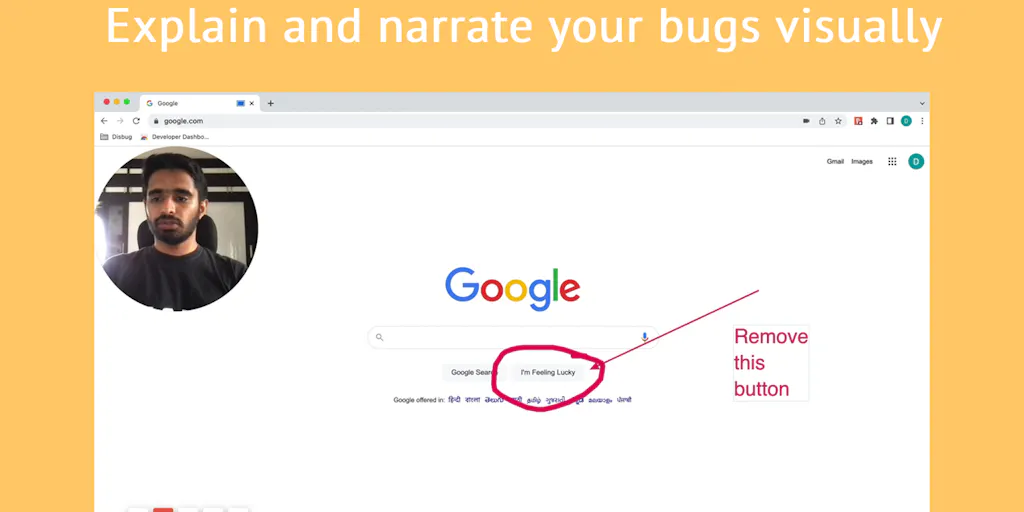
- Screen recording and narration
- Screenshot capture with annotations
- Console logs capture
- Network logs capture
- User events tracking (clicks, form fills)
- Designer mode for live website editing
- Pixel-perfect design feedback
- Jira integration
- Automated ticket creation
- Local storage and browser data capture
- Operating system and browser version logging
Who Should Use Disbug?
Reduce friction between Development and QA teams
Streamline client feedback loops for digital agencies
Capture end-user feedback via in-app widget for SaaS companies
Reduce bug reporting time for software testing companies
Provide pixel-perfect design feedback for designers
Speed up sprint completion and story point delivery
Disbug: Pros & Cons
✓Pros
- Reduces bug reporting from 15 steps to 3 steps
- Captures complete session context automatically
- Saves 5-15% of employee hours annually ($3,000+ per employee)
- Seamless integration with issue tracking tools
- Free forever for basic use
- No credit card required for 7-day trial
- Works across all browsers and operating systems
- Eliminates need for clarification calls and Zoom meetings
- Designers can edit live websites directly instead of using screenshots
Frequently Asked Questions about Disbug
What information does Disbug capture when I report a bug?
Disbug captures screen recordings, screenshots, console logs, network logs, user events (clicks and form fills), local storage, screen size, viewport size, operating system, and browser version.
Does Disbug integrate with project management tools?
Yes, Disbug integrates with issue tracking tools like Jira and can automatically create tickets in your pre-configured issue tracker.
How much time can Disbug save my team?
Disbug is guaranteed to save 5-15% of hours spent on bug reporting, which amounts to approximately $3,000+ per employee annually (based on $60k/year average salary).
Is Disbug available for all browsers?
Disbug is available as a Chrome extension. It captures data about all browsers but the extension itself runs in Chrome.
Do I need to provide a credit card for the trial?
No, Disbug offers a free 7-day trial with no credit card required.
Tool Details
- Pricing
- Free
- Category
- Screen Recorders
- Added
- Jul 2026
More Screen Recorders Tools
7 tools in the same category

Turn boring screenshots into professional graphics in seconds

Record, edit, and share AI-powered videos to supercharge team communication

Professional screen recording and live presentations—no editing required.
Record, edit, and share professional videos - all in one tool

Drag screenshots and clips from the notch straight into Slack—no uploads, no links.
Recently Added AI Tools
New tools added to the directory

Deploy AI workers that take real actions in your systems, 24/7.

Free API to extract Open Graph data from any URL instantly


From the Blog
Latest guides and tips on AI tools
Best AI Tools for Ecommerce in 2026
Best AI Tools for Ecommerce in 2026
Best AI ToolsBest AI Tools for Digital Marketers in 2026
Best AI Tools for Digital Marketers in 2026
Best AI ToolsBest AI Tools for Freelancers in 2026
Best AI Tools for Freelancers in 2026
Best AI ToolsBest AI Tools for Small Business Owners in 2026
Best AI Tools for Small Business Owners in 2026
Best AI ToolsWant to list your AI tool on NextStair?
Submit Tool