

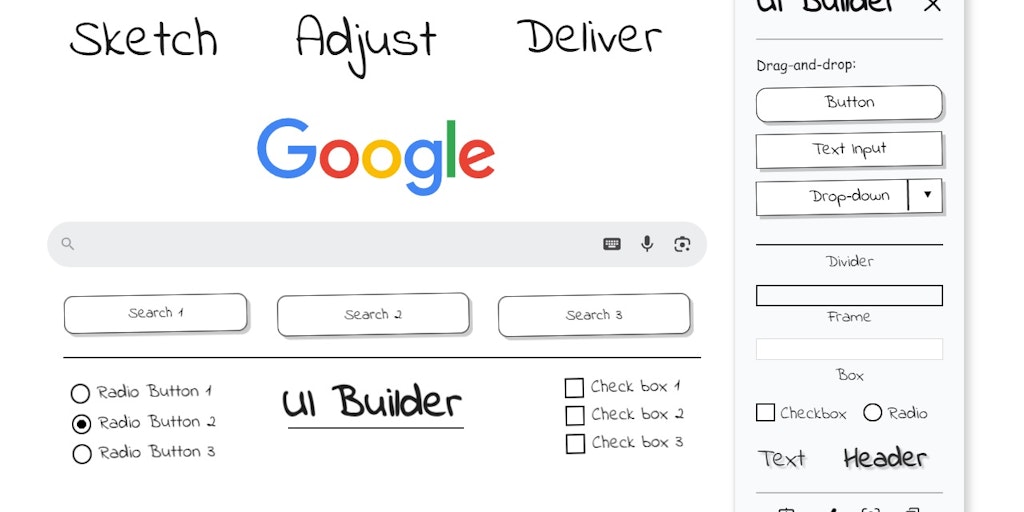
UI Builder - Mockup tool
Sketch UI wireframes directly on any webpage in Chrome
What is Ui Builder Mockup Tool?
UI Builder is a Chrome extension for creating wireframes and mockups directly on live websites or blank canvases. Using drag-and-drop sketch-style elements, users can quickly design UI layouts, resize components, edit text in-place, and export screenshots without leaving the browser. Built for designers, product owners, developers, and business analysts who need rapid prototyping with privacy-first, local-only storage.
Need help implementing UI Builder - Mockup tool?
Find verified specialists who work with UI Builder - Mockup tool
Key Features of Ui Builder Mockup Tool
- Drag-and-drop widget insertion (buttons, headers, inputs, frames, dividers)
- In-place text editing and color customization
- Smooth resizing with keyboard shortcuts
- Pixel-perfect PNG export with marquee selection
- Screenshot to clipboard functionality
- True WYSIWYG editing
- Local browser storage (no cloud)
- Privacy-first with no tracking or analytics
- Lightweight injection for fast browsing
- Keyboard shortcuts (Ctrl/Cmd+C/V, Delete, Esc)
- Support for 30 languages
Who Should Use Ui Builder Mockup Tool?
Quick idea sketching before opening heavy design tools
Annotating client websites during live calls
Teaching web design basics without extra software
Creating product screenshots for specifications and tickets
Prototyping design changes directly on live websites
Ui Builder Mockup Tool: Pros & Cons
✓Pros
- No heavy design software needed
- Instant feedback on live websites
- Local storage ensures privacy
- Keyboard-friendly interface
- Lightweight and doesn't slow down browsing
- Supports multiple languages (30 total)
- Free to use
Frequently Asked Questions about Ui Builder Mockup Tool
What is UI Builder – Mockup Tool?
UI Builder is a Chrome extension that lets you create wireframes and mockups directly on any live website or blank canvas using drag-and-drop sketch-style elements.
Do I need to install design software to use it?
No, UI Builder runs entirely in your Chrome browser, so you don't need Figma, Adobe, or other design tools to create quick mockups.
Is my data stored in the cloud?
No, all your work is stored locally in Chrome's local storage with no network calls, analytics, or trackers.
How do I export my mockup?
You can save the selected area as PNG, copy screenshots to your clipboard, or paste directly into Slack, Figma, or Jira.
Who is this tool designed for?
UI Builder is built for designers, product owners, developers, and business analysts who need fast prototyping without switching tools.
Tool Details
- Pricing
- Free
- Languages
- 30 languages
- Category
- Mockup Generators
- Added
- Jul 2026
More Mockup Generators Tools
7 tools in the same category

Type a prompt. Get a realistic mockup in seconds.


Create photo-realistic mockups in real time with AI-powered 3D surface visualization.

Create realistic wall mockups for your art listings in 60 seconds


Recently Added AI Tools
New tools added to the directory

Deploy AI workers that take real actions in your systems, 24/7.

Free API to extract Open Graph data from any URL instantly


From the Blog
Latest guides and tips on AI tools
Best AI Tools for Ecommerce in 2026
Best AI Tools for Ecommerce in 2026
Best AI ToolsBest AI Tools for Digital Marketers in 2026
Best AI Tools for Digital Marketers in 2026
Best AI ToolsBest AI Tools for Freelancers in 2026
Best AI Tools for Freelancers in 2026
Best AI ToolsBest AI Tools for Small Business Owners in 2026
Best AI Tools for Small Business Owners in 2026
Best AI ToolsWant to list your AI tool on NextStair?
Submit Tool